How big is this PR going to be?
Your status bar now knows.
gitfit shows the diff stats of your current branch against its base, right next to the branch name. Lines added, lines removed, files touched. Live, no clicks required.
Base branch, active filter, line delta, file counts. Hover for the resolved ref. Click to change scope or filter.
Why
You have been "almost done" for two days. You run git diff develop --shortstat for the fourth time today. It says 1,377 insertions. You close the terminal and pretend you did not see that.
gitfit keeps the number on screen so you stop pretending. Reviewers have a finite attention budget. So do you.
How it works
The diff is taken against the merge-base of your base branch and HEAD, the same thing a pull request shows. Commits that land on develop after you branched do not inflate your numbers.
What counts
base everything since you branched. staged only the index. unstaged only the working tree.
Which files count
all everything. app code under apps, src, lib minus tests. tests specs, fixtures, snapshots, mocks.
Picked for you
First existing branch wins: develop, main, then origin/HEAD. No base at all? Only uncommitted work counts.
Always current
Updates on save, on git state change, and when the window regains focus. Untracked files are not counted.
Bystanders excluded
Migrations, docs, lockfiles and CI config only count under all. They are not the PR. They are the PR's luggage.
Just git
Needs git on your PATH. No dependencies, no telemetry, no account.
Install
Published on Open VSX. Works in Cursor, VSCodium, Gitpod, Theia and any editor that reads the Open VSX registry. For VS Code itself, install the VSIX from the GitHub release.
Extensions → search "gitfit" → Install
# or from the command line
cursor --install-extension anupam.gitfit
codium --install-extension anupam.gitfit
# download gitfit-*.vsix from
# https://github.com/anupam-io/gitfit/releases
code --install-extension gitfit-0.1.0.vsixgit clone https://github.com/anupam-io/gitfit ~/gitfit
ln -s ~/gitfit ~/.vscode/extensions/gitfit
# reload the window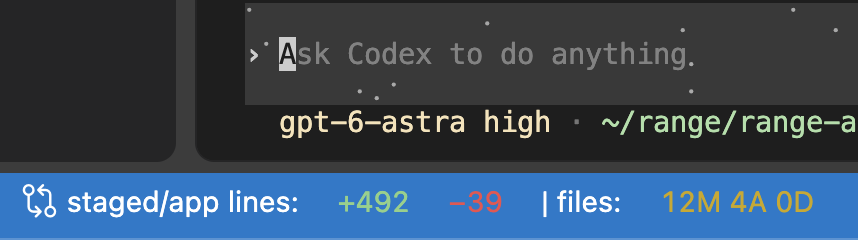
Settings
Two settings. Both optional.
| Setting | Default | What |
|---|---|---|
gitfit.baseBranches | ["develop", "main"] | Branches to try as base, in order. origin/HEAD is always tried last. |
gitfit.appPaths | ["apps", "src", "lib"] | Top-level directories that count as application code for the app filter. |